Ready to turn your Android device into a streaming powerhouse? An IPTV player for Android is the key. Think of it as a special app that plays live TV and movies from an IPTV service, transforming your phone, tablet, or Android TV box into a full-blown entertainment hub.
The player itself is only playback software. It does not include channels, subscriptions, credentials, playlists, or viewing rights. Use only playlists and streams you are authorized to access, and verify the source before entering a URL or account credential.
Picking the right IPTV player for Android is your first real step. Unlike old-school cable, IPTV (which stands for Internet Protocol Television) sends media right over your internet connection. This gives you way more flexibility. The player app is what takes the playlist link from your IPTV provider and turns it into the shows and channels you want to watch.
As an Amazon Associate I earn from qualifying purchases.
Playback depends on the app, the source stream, the network, and the device. If your current hardware struggles to run the player, you can compare current Android TV boxes on Amazon, but new hardware cannot fix an unavailable or unauthorized stream.
When you're shopping around for an app, a few features are absolute must-haves for a good time. These are the things that separate a basic, frustrating player from a truly great one.
Before we get into the details of which apps are best, let's break down the essential features you should look for in any IPTV player. This will help you understand what separates the good from the great.
This table breaks down the crucial features that define a high-quality IPTV player, ensuring you choose an app that delivers a smooth and enjoyable streaming experience.
| Feature | Why It Matters for Your Streaming |
|---|---|
| Broad Playlist Support | Ensures your app can load playlists from virtually any IPTV provider, whether they use M3U, M3U8, or Xtream Codes. |
| EPG Integration | A clean Electronic Program Guide (EPG) is like a traditional TV guide, making it easy to see what's on now and what's next. |
| User-Friendly Interface | An intuitive layout means less time fumbling with menus and more time watching your content. |
| Multi-Screen & PiP Support | Lets you watch multiple channels at once or keep a small window playing while you use other apps. Great for sports fans! |
| VOD & Catch-Up | Support for Video-on-Demand (movies/shows) and Catch-Up TV (replaying past broadcasts) turns your player into a full media center. |
| Parental Controls | Gives you peace of mind by allowing you to lock specific channels or categories with a PIN. |
Having these features on your checklist will make sure you end up with an app that’s powerful, flexible, and easy to use day-to-day.
The global IPTV market is growing fast. The Business Research Company valued it at $189.25 billion in 2025 and projects it will reach $221.62 billion in 2026, on the way to $421.53 billion by 2030. That growth reflects viewers moving from traditional TV to more flexible, internet-based options. You can read the full IPTV market forecast from The Business Research Company.
Your Android device—whether it’s a high-end phone or a dedicated TV box—has the guts to be your all-in-one entertainment system. The right player app is what brings that potential to life.
If you're ready to see which apps made our cut, check out our in-depth guide to the best IPTV apps for Android.

Published by PlasmaX, the organization behind the PlasmaX web app, maintaining this site since 2023. This Android IPTV player guide was last reviewed on under our editorial and fact-checking process. Spotted an error? Request a correction.
A great IPTV player for Android is only half the story; the hardware it runs on is just as crucial. Think of it this way: your device's performance directly shapes your viewing experience. It's the difference between smooth, crisp playback and that dreaded, frustrating lag.
Investing in the right gear isn't just about getting a new gadget—it's about making sure your IPTV player can actually do its job properly.
And it's a booming market. The Business Research Company valued the global Android set-top box and television market at $101.74 billion in 2025 and projects it will reach $117.45 billion in 2026, on the way to $197.64 billion by 2030. That explosion in growth tells you one thing: more and more people are turning to dedicated devices for a better streaming life. You can dive deeper into these market insights if you're curious.
For those who just can't stand compromise, a high-performance Android TV box is the way to go. Think of powerhouses like the NVIDIA Shield TV Pro. These things are built for serious streamers. They pack beefy processors, plenty of RAM (often 3GB or more), and top-notch graphics chips that make streaming 4K sports or high-bitrate movies feel effortless. No stutters, no hiccups.
Here's why a premium box makes a real difference:
A more capable box may make the player interface more responsive, but it cannot guarantee buffer-free playback. Compare specifications, supported apps, and current Android TV box listings on Amazon before choosing.
A streaming stick can be a compact option for a secondary television. Confirm that your preferred player is available for the device and compare current streaming sticks on Amazon without assuming every app or format is supported.
Sure, they might have less raw power than a premium box, but today's sticks are more than capable of handling crisp HD and even 4K streams without breaking a sweat.
Of course, none of this matters if your internet can't keep up. Before you buy any hardware, make sure your connection is ready. We've put together a handy guide on the right internet speed for streaming to help you avoid any bottlenecks.
Alright, you've got your Android device ready to go. Now for the fun part: bringing your IPTV service to life. Getting your IPTV player for Android set up is actually pretty simple once you see how it's done. The steps below skip the confusing tech talk, getting you from installation to watching your favorite shows in just a few minutes.
Think of it as a quick, three-step dance: download the app, install it, and then pop in your playlist URL. That's it.
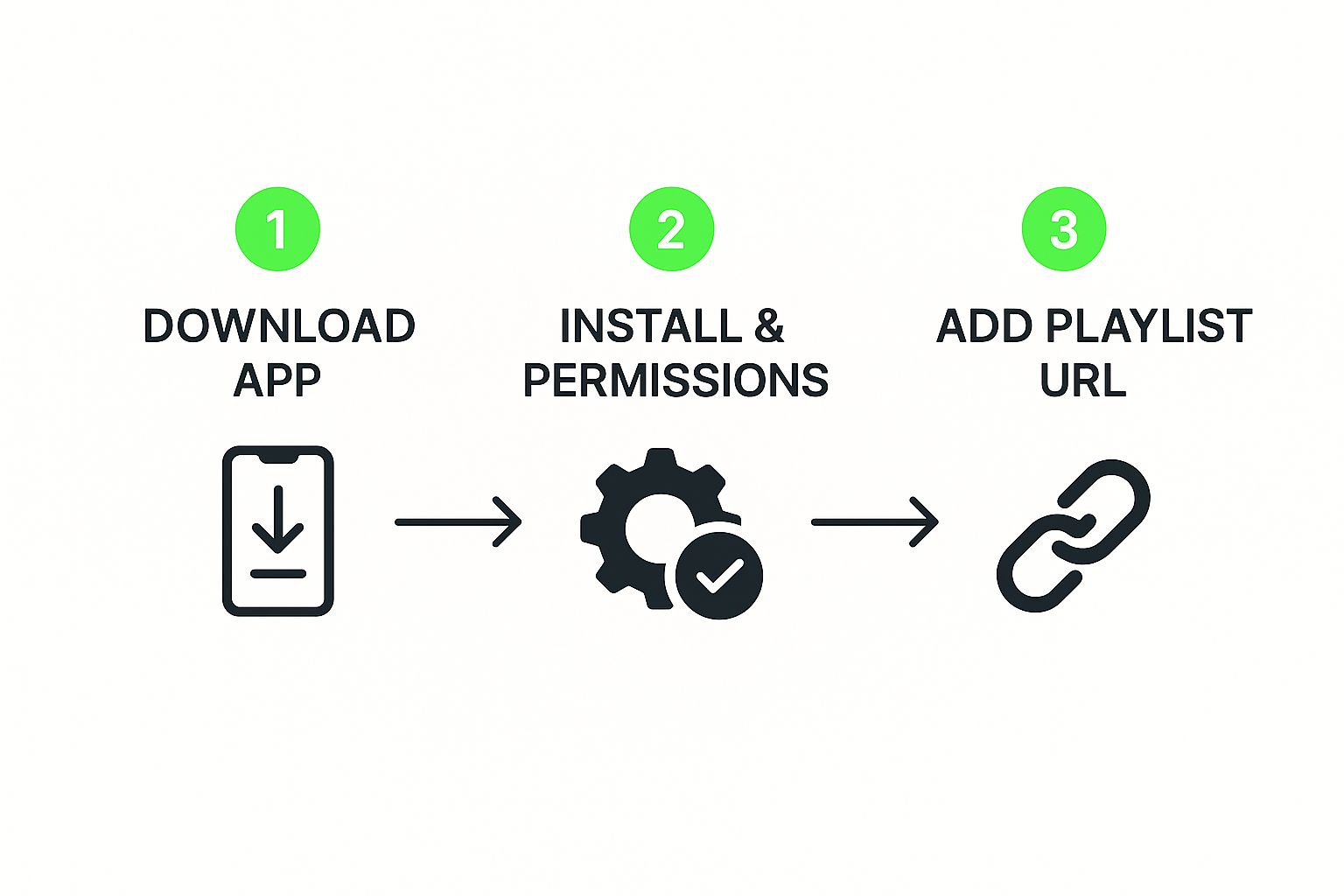
This image nails it. Once the app is on your device, the only thing standing between you and your content is adding your playlist. That's the key that unlocks everything.
After installing a player from an official source, load only a playlist or stream URL you are authorized to use. The content source should provide the compatible details; the player does not create a subscription or grant access rights.
You'll almost always see two ways to get logged in:
Whichever path you take, the player uses these credentials to pull in your channel list and the Electronic Program Guide (EPG).
Once your channels are all loaded up, you can start making the experience your own. Most good players let you create "favorite" groups, which is a lifesaver. You can put all your go-to sports, news, or movie channels in one spot so they're always just a click away.
It also helps to hide entire categories you know you'll never watch. It just cleans up the whole interface and makes finding what you actually want to see so much faster.
The core function of any IPTV player is to interpret playlist files. Remember, the player is just the vehicle; you must supply the fuel, which is your M3U playlist. This is a crucial distinction for new users.
Popular IPTV apps are incredibly flexible, supporting formats like M3U8, XSPF, and Xtream to let you build out custom channel lists. While these apps are usually lightweight and updated pretty often, they don't come with any channels built-in. You have to bring your own legally sourced playlist to the party.
If you're curious about personalizing your viewing even more, you might want to learn how to create an M3U playlist with our detailed guide.
Getting your playlist loaded is just the start. The real magic happens when you start tweaking your IPTV player for Android to get every last drop of performance out of it. Think of these adjustments as the difference between a standard, out-of-the-box setup and a truly reliable streaming machine.
These are the adjustments that take streaming quality from just "good" to consistently great.
One of the first settings worth checking is the video decoder. Most decent players let you switch between hardware and software decoding. If you’re ever stuck with glitches or a black screen on a specific channel, swapping this setting is often the quickest fix.
Hardware decoding is usually the default because it’s more efficient, but software decoding can be a lifesaver when you run into weird video formats.
Let's be honest: your streaming quality is only ever as good as your network connection. Wi-Fi is convenient, sure, but it's also notorious for interference and speed drops—the two biggest culprits behind buffering. For a rock-solid, buffer-free experience, a wired connection is always the way to go.
If Wi-Fi is unstable and your device supports wired networking, compare a compatible USB Ethernet adapter on Amazon. If wiring is impractical, check placement and congestion before replacing equipment; current Wi-Fi router listings on Amazon can help you compare supported standards and ports.
A stable network is the unsung hero of IPTV. Investing in a solid connection via Ethernet or a capable router solves over 90% of common buffering issues before they even start.
Sometimes, the player that comes with your IPTV app just can't handle a specific stream. That’s when using an external player becomes a total game-changer. Apps like VLC or MX Player are legendary for their ability to play pretty much any video format you can throw at them. Most quality IPTV players will let you set an external player right in the settings menu.
Finally, don't be afraid to dive into the buffer settings. Increasing the buffer size can really smooth things out if your internet connection is a bit unstable, as it pre-loads more of the video. For a deep dive into how the big players make their streams so smooth, it's fascinating to see how TikTok optimizes video streaming. These small tweaks really can make a massive difference in your day-to-day viewing.
Even the best IPTV player for Android can throw you a curveball now and then. We’ve all been there: a show starts buffering right at the good part, a channel just won't load, or the program guide (EPG) decides to take a vacation. It's frustrating, but most of these headaches are surprisingly easy to fix.
Before you start pointing fingers at your IPTV provider, it's a good idea to check your own setup first. More often than not, a choppy stream is just a sign of a crowded network or a device that's running on fumes. One of the simplest yet most powerful tricks in the book is to clear your player's cache. Over time, this temporary data can get messy and start causing all sorts of playback errors.
If hitting the restart button doesn't do the trick, don't worry. Just run through this checklist to quickly pinpoint what's going wrong.
A lot of streaming problems, especially that dreaded buffering wheel, aren't actually caused by the IPTV player app. It's usually just a buildup of old, temporary data. Making it a habit to clear the cache can seriously boost your player's performance and stability.
Keeping your app's data clean is a crucial bit of maintenance. For a good breakdown of how it works, take a look at our guide on how to clear cache on Kodi; the core ideas are pretty much the same for any streaming app. If you've tried all this and are still stuck, then it might be time to reach out to your provider.
We see a lot of the same questions pop up when people start exploring IPTV on their Android devices. Let's clear the air and tackle the most common ones we hear, so you can get to streaming with peace of mind.
Yes, the player app itself is 100% legal. You can find many of them right in the official Google Play Store. Think of it just like any other media player, such as VLC—it's simply a tool for playing content.
The real question is about the source of your channels. The legality hinges entirely on the IPTV service providing your playlist. To stay on the right side of the law, you need to use a provider that has the proper licenses to broadcast the channels you're watching. A big red flag is any service offering thousands of channels for a price that seems way too good to be true.
An M3U playlist is basically just a simple text file. Inside that file are the direct web links (URLs) that point to all the live TV streams your IPTV service offers. Your player reads this file to load up all the channels, sort of like a digital TV guide.
An authorized content source may provide an M3U file, an M3U URL, or account details compatible with the player. Do not use shared, scraped, or unverified credentials or playlists.
You absolutely can. The Amazon Fire Stick is built on Fire OS, which is really just a customized version of Android. Because of this, it's compatible with almost all Android IPTV apps out there.
Install the player from Google Play, the Amazon Appstore, or the developer's official distribution channel when one is available. App availability varies by Fire TV model and region. If you need hardware, compare the current Amazon Fire TV Stick listings on Amazon.
Ready to jump right into streaming without any downloads? Try the PlasmaX today! Just paste your M3U link into our browser-based player and get instant access to your favorite content on any device. Give it a go at https://plasmax.io.